
How to Open a Deriv Account: A Step by Step Guide
By Laxie · Updated · How we review · Affiliate disclosure
Opening a Deriv account takes about five minutes, and you get a free demo account as soon as you sign up. Setting up a real account adds six short screens, and you can finish some of them later. This guide shows every screen in the order you will see it, with screenshots, plus the small mistakes that slow most people down.
The short version
- Choose your country on the Deriv signup page and tap Sign up.
- Sign up with Google, Facebook, Apple, or your email or phone number.
- Confirm the code Deriv sends you. Your demo account is ready.
- Choose Try real trading and complete six quick screens: personal details, phone, ID, address, account reason, and terms.
- Make your first deposit: from $1 with Deriv P2P or USDT (TRC20), or from about $5 with mobile money.
If you already know Deriv is the broker you want, you can open your Deriv account here and follow along in a second tab. Otherwise, read on first.
Live in the UAE? UAE residents sign up on a separate Deriv platform with a different flow. Follow our guide to opening a Deriv account in the UAE instead (also in Arabic, Urdu, Hindi, Filipino and Malayalam).
What You Need Before You Start
- An email address or phone number you can access right now
- A valid government ID: passport, national ID card, or driver’s licence
- Your phone or a laptop with a camera, to photograph your ID
- Location access on your device, or a recent proof of address, to verify where you live
- A payment method in your own name for deposits
Part 1: Create Your Deriv Account (About 2 Minutes)
Step 1: Choose Your Country
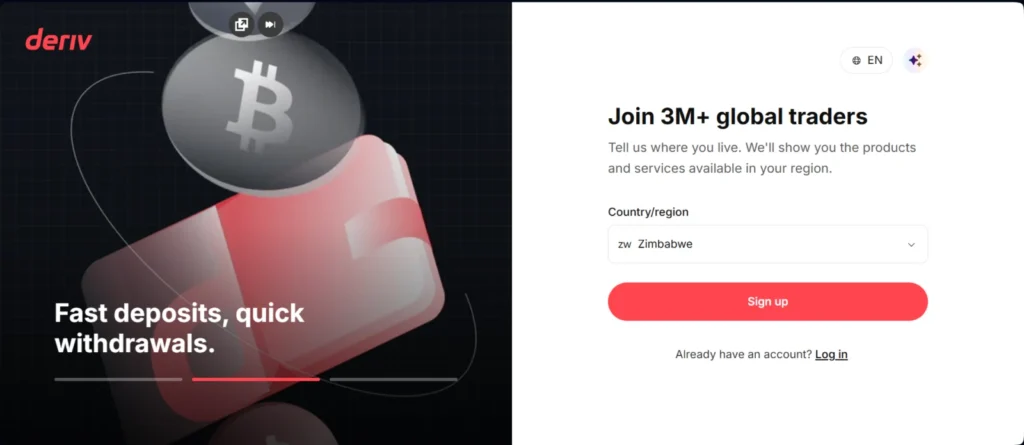
Go to the Deriv signup page. The first screen asks where you live, because Deriv shows different products and payment options by region. Choose the country you actually live in, the one on your ID, then tap Sign up.
Tip: Picking the wrong country is one of the most common reasons verification fails later, and it is not easy to change once your account exists.
Step 2: Choose How You Want to Sign Up
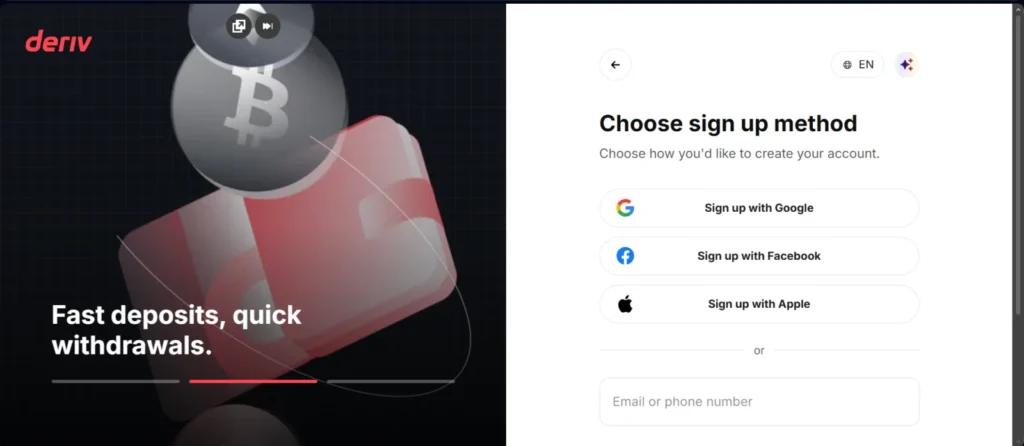
Next, pick a sign up method: Google, Facebook, Apple, or your email address or phone number. Google or Apple is the fastest. Email gives you a login that does not depend on a social media account.
Tip: Use an email or number you check every day. Deriv sends security codes and withdrawal confirmations there.
Step 3: Confirm Your Email or Phone
Deriv sends a verification code or link to the email or phone number you entered. Confirm it and, if you signed up with email, set a strong password. No code after a few minutes? Check your spam and promotions folders, then request a new one rather than signing up again.
Step 4: Choose Demo or Real Trading
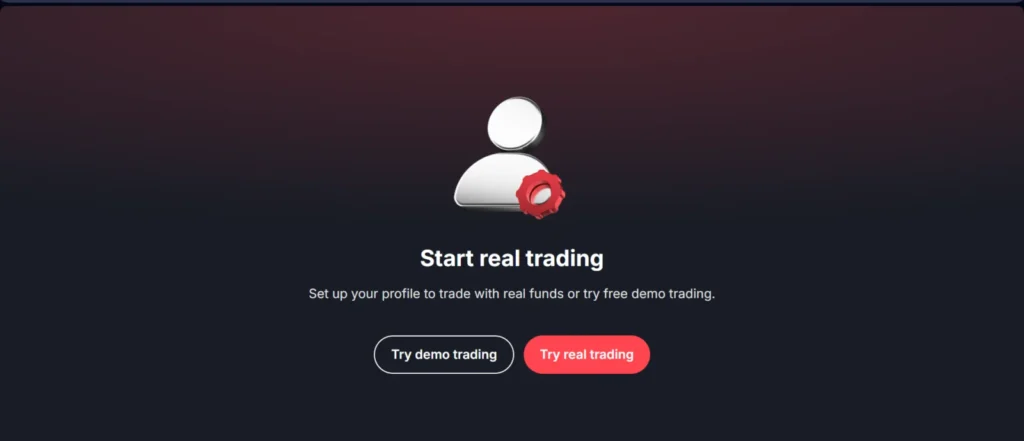
You now land on a screen with two options. Try demo trading takes you straight to a practice account with virtual funds, no documents needed. Try real trading starts the short profile setup below. You can open the demo first and come back to the real account whenever you are ready.
Part 2: Set Up Your Real Account (6 Short Screens)
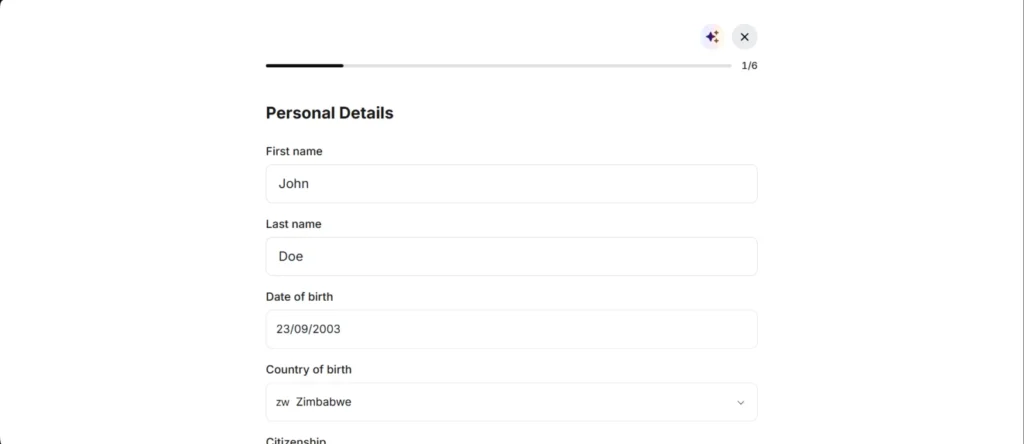
A progress bar at the top shows where you are, from 1 of 6 to 6 of 6. Two of the screens have a Do it later option, but you will need to finish them before you can withdraw.
Step 5: Personal Details (1 of 6)
Enter your first name, last name, date of birth, country of birth, and citizenship. Type everything exactly as it appears on your ID. A small spelling difference is the most common reason a verification gets sent for manual review.
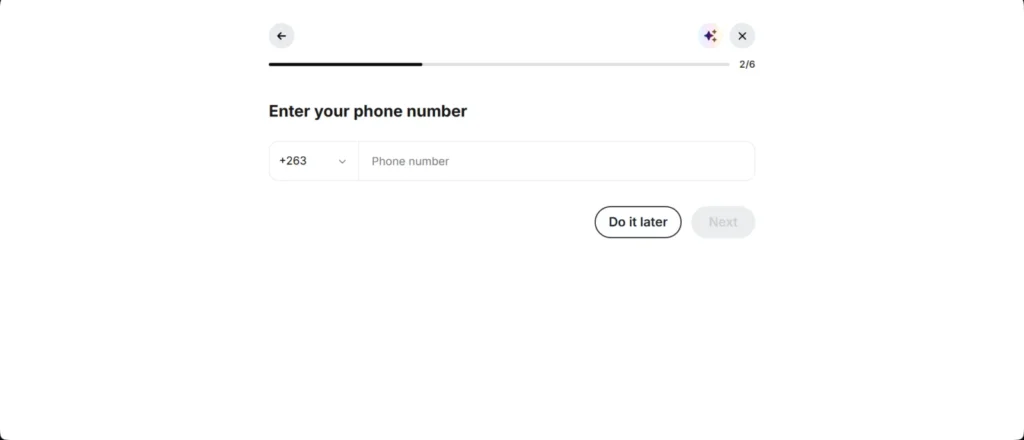
Step 6: Phone Number (2 of 6)
Add your phone number with your country code already filled in. You can tap Do it later, but adding it now helps with account security and recovery.
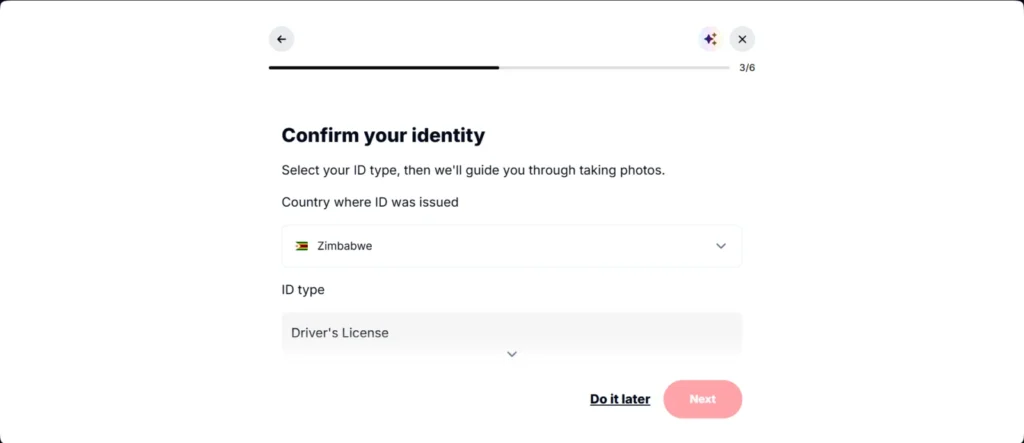
Step 7: Confirm Your Identity (3 of 6)
Choose the country that issued your ID and the ID type (passport, national ID, or driver’s licence). Deriv then guides you through taking photos of the document. You can skip this with Do it later, but your account needs it before any withdrawal, so it is worth doing now.
To get approved the first time:
- Photograph the whole document with all four corners visible
- Use good light with no glare over the photo or text
- Check that the name matches your profile and the ID has not expired
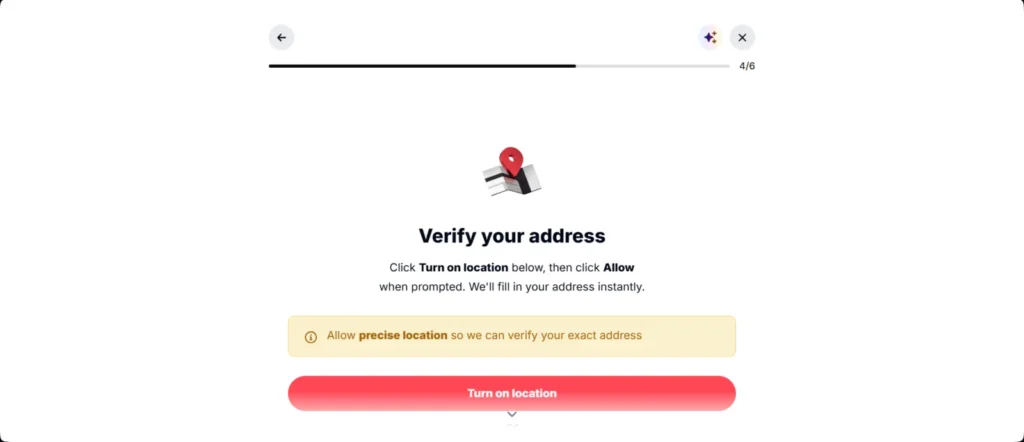
Step 8: Verify Your Address (4 of 6)
Deriv can fill in your address automatically from your location. Tap Turn on location, then Allow when your browser asks, and choose precise location so the address matches. If you would rather not share your location, scroll down for the alternative option on the same screen.
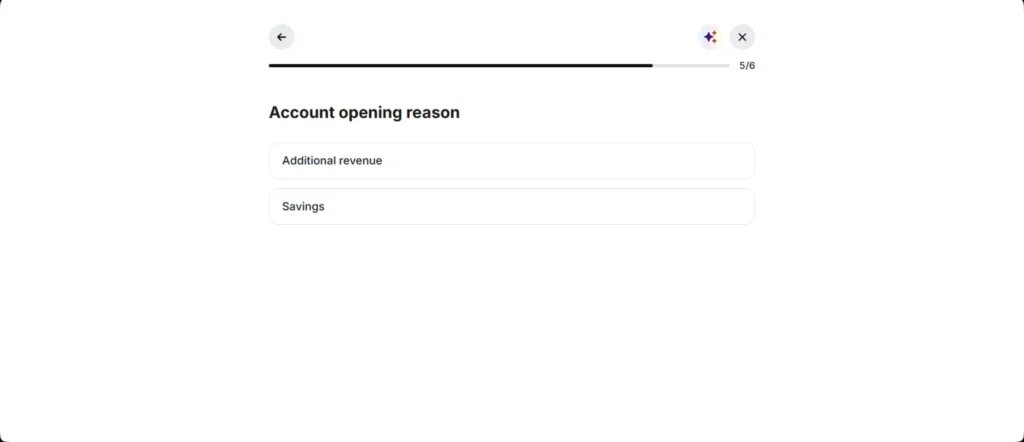
Step 9: Account Opening Reason (5 of 6)
Pick why you are opening the account, for example Additional revenue or Savings. This is a standard compliance question every broker asks, so just choose the one that honestly fits.
Step 10: Accept the Terms (6 of 6)
The last screen shows which Deriv company your account is opened with and a risk warning. Read the risk warning properly, since it explains that you can lose all the money you put into a trade, then tap Accept.
Part 3: Make Your First Deposit
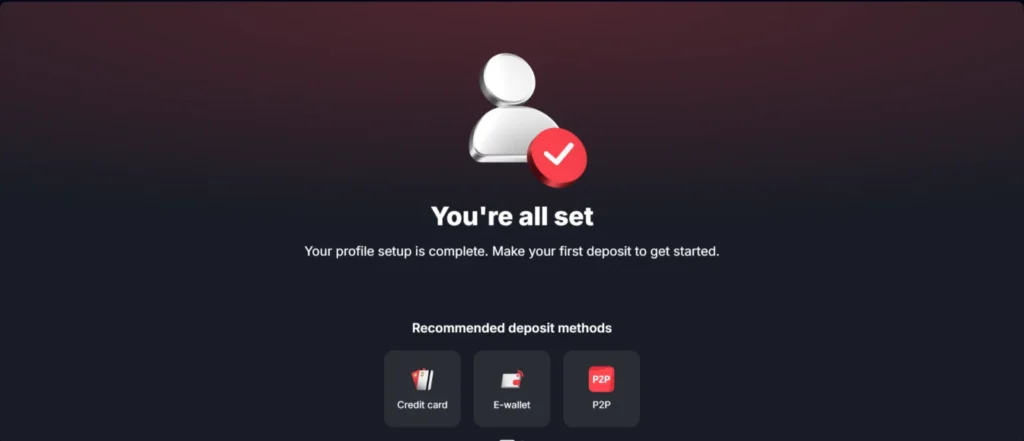
Step 11: You’re All Set
Once you accept, you will see a confirmation screen with recommended deposit methods for your country, such as credit card, e wallet, and Deriv P2P. Minimums depend on the method: from $1 with Deriv P2P or USDT (TRC20), around $5 with mobile money like M-Pesa, MTN, and Airtel, and around $10 with cards. Our Deriv minimum deposit guide covers this in more detail, and if you plan to use P2P, see how to withdraw with Deriv P2P.
Demo or Real Account: Which Should You Start With?
| Demo account | Real account | |
|---|---|---|
| Money used | Virtual funds | Your own money |
| Documents needed | No | Yes, before withdrawals |
| Can you withdraw? | No | Yes |
| Best for | Learning the platform and testing a strategy | Trading once you are consistent on demo |
Most beginners are better off spending at least a couple of weeks on demo first. It costs nothing, and it shows you how the platform behaves before a mistake costs real money.
Common Problems and How to Fix Them
I did not receive the verification code
Check spam and promotions folders, confirm you typed the address or number correctly, and request a new code. Avoid creating a second account, since duplicate accounts cause problems at verification.
My ID was rejected
Read the rejection reason before trying again. It is almost always a blurry or cropped photo, an expired document, or a name that does not match your profile. Fix that specific issue, then retake the photo.
The address step did not work
Make sure you allowed precise location, not approximate, and that location is switched on in your phone or browser settings. If it still fails, use the alternative option on the same screen.
Deriv is not available in my country
Deriv only provides its services to residents of certain countries, and the list can change. If your country is not in the signup list, Deriv is not available to you. Using someone else’s details to get around this breaks Deriv’s terms and puts your funds at risk.
I chose the wrong country
Contact Deriv support through live chat before you deposit. It is much easier to correct on an empty account than on a funded one.
What to Do Next
Spend some time on demo, then learn to size every trade with our position size calculator so a single loss never hurts too much. Keep the economic calendar open to see which news events can move the market. Still deciding? Our full Deriv review covers platforms, fees, and withdrawals, and what synthetic indices are explains the product Deriv is best known for. For more on getting verified quickly, see fast KYC verification.
Get one practical trading tip a week
Free beginner tips, broker deposit and withdrawal updates for Africa and the UAE, and new guides. No spam, unsubscribe any time.
Frequently Asked Questions
How long does it take to open a Deriv account?
About five minutes to sign up and a few more for the six profile screens. Identity checks usually take from a few minutes to a couple of days.
Do I need ID to open a Deriv account?
Not for a demo account. For a real account you can tap Do it later on the ID step, but you must verify your identity before you can withdraw.
What is the minimum deposit on Deriv?
From $1 with Deriv P2P or USDT (TRC20). Most mobile money options start around $5 and cards around $10, depending on your country.
Can I open a Deriv account on my phone?
Yes. The steps are the same on mobile, and the ID step uses your phone camera.
Why does Deriv ask for my location?
To verify your address automatically. You can use the alternative option on the address screen if you prefer not to share it.
This post contains an affiliate link. If you sign up through the links above, we may earn a commission at no extra cost to you. Trading involves risk and is not suitable for everyone; this is not investment advice.
Deriv offers complex derivatives, such as options and contracts for difference (“CFDs”). These products may not be suitable for all clients, and trading them puts you at risk. Please ensure you understand the following risks before trading Deriv products: (a) you may lose some or all of the money you invest in the trade; (b) if your trade involves currency conversion, exchange rates will affect your profit and loss. You should never trade with borrowed money or with money that you cannot afford to lose. Trading involves risk and is not suitable for everyone; this is not investment advice.