How to Open a Weltrade Account: A Step by Step Guide
By Laxie · Updated · How we review · Affiliate disclosure
Opening a Weltrade account looks more complicated than it actually is. If you have never signed up with a forex broker before, the registration form, the account type menu, and the identity verification step can all feel like unnecessary hurdles standing between you and your first trade. In practice, the whole process from creating a profile to funding a live account takes most people under fifteen minutes once they know what to expect, and this guide walks you through every screen along the way.
👉 If you already know Weltrade is the broker you want to use, you can open an account here and follow along as you go. If you are still weighing your options, keep reading first.
What You Need Before You Start
Before you start the signup process, have the following ready:
- A valid email address and phone number
- A government issued ID (passport, national ID card, or driver’s license) for identity verification later
- Access to a desktop browser or the Weltrade mobile app
- Confirmation that Weltrade actually serves your country. Weltrade restricts its services to residents of the United States, Canada, the United Kingdom, European Union member states, Russia, Belarus, India, Iran, and North Korea, on top of standard international sanctions lists. If you live outside those excluded regions, you should be able to register
Step 1: Fill In the Sign Up Form
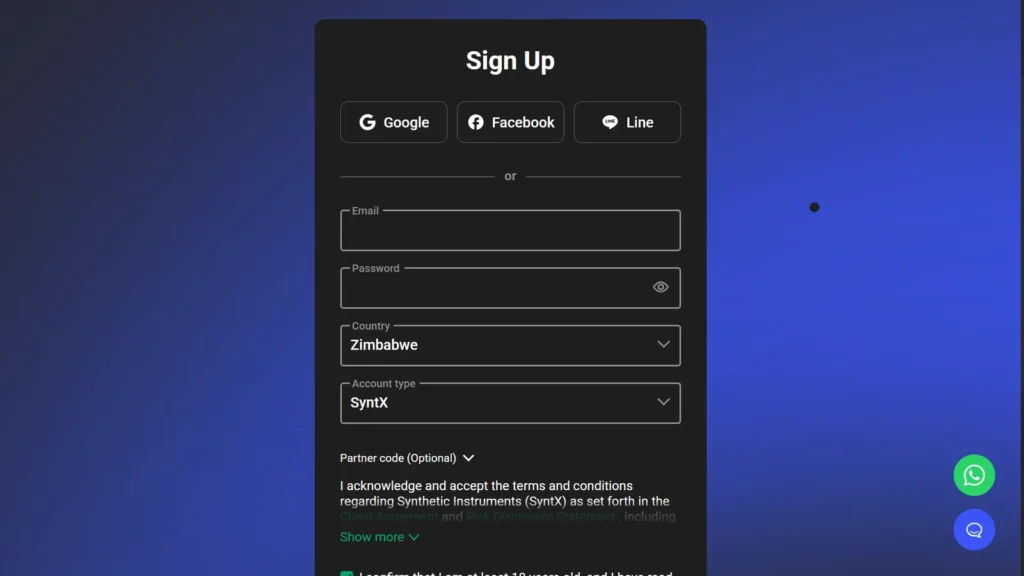
Go to the Weltrade signup page. You can sign up with Google, Facebook or Line, or fill in the form yourself:
- Email: an address you can open right now, because Weltrade sends a confirmation link to it.
- Password: this is your Personal Profile login. Use a strong one you do not use anywhere else.
- Country: choose the country you actually live in.
- Account type: pick the account Weltrade opens for you straight away (see the list below). You can add other types later.
- Partner code (Optional): leave it as it is if you came through our link.
- Tick the boxes to accept the terms and confirm you are at least 18, then submit the form.
The account types you can choose from are:
- Micro: $1 minimum deposit, leverage up to 1:2000, spreads from 2.3 pips, no commission. Built for beginners and small scale trading
- Cent: $1 minimum deposit, leverage up to 1:2000, spreads from 1.5 pips, no commission. Balance shown in US cents
- Pro: $10 minimum deposit, leverage up to 1:2000, spreads from 0.5 pips, no commission. For active traders who want tighter spreads
- SyntX: $1 minimum deposit, leverage up to 1:10000 (varies by instrument), floating spreads, no commission. Trades synthetic instruments only
- Raw Spread: $100 starting deposit, leverage up to 1:2000, spreads from 0 pips, commission per side from $1.50 per lot on forex and metals
If you are a beginner with a small amount of capital, Micro or SyntX are the two accounts most new Weltrade traders start with. Our Weltrade account types guide compares them in detail.
Step 2: Confirm Your Email
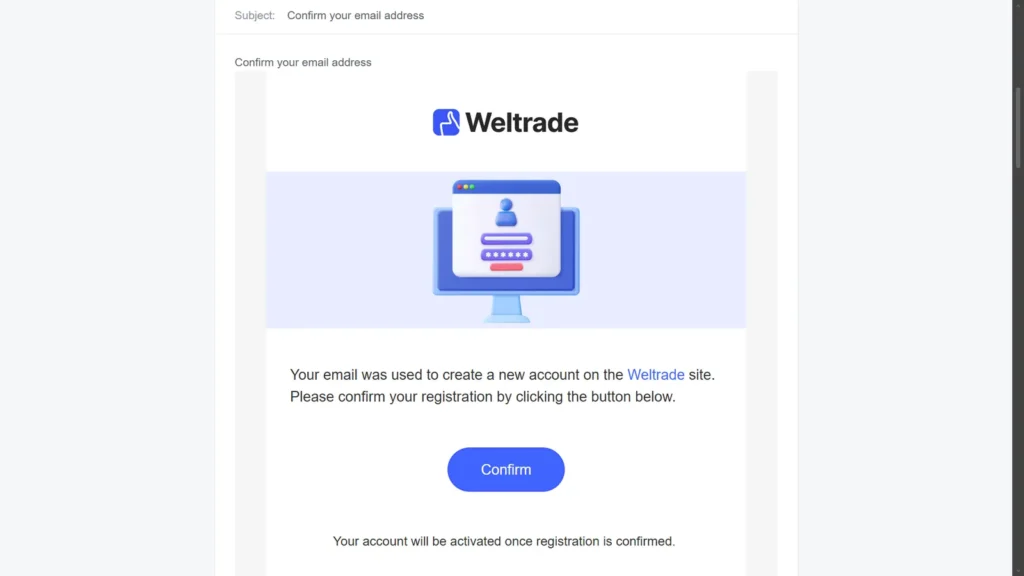
Weltrade sends an email with the subject Confirm your email address. Open it and tap Confirm. Your account is only activated once you do this, so check your spam or promotions folder if it has not arrived within a few minutes.
Step 3: Add Your Phone Number (Optional)
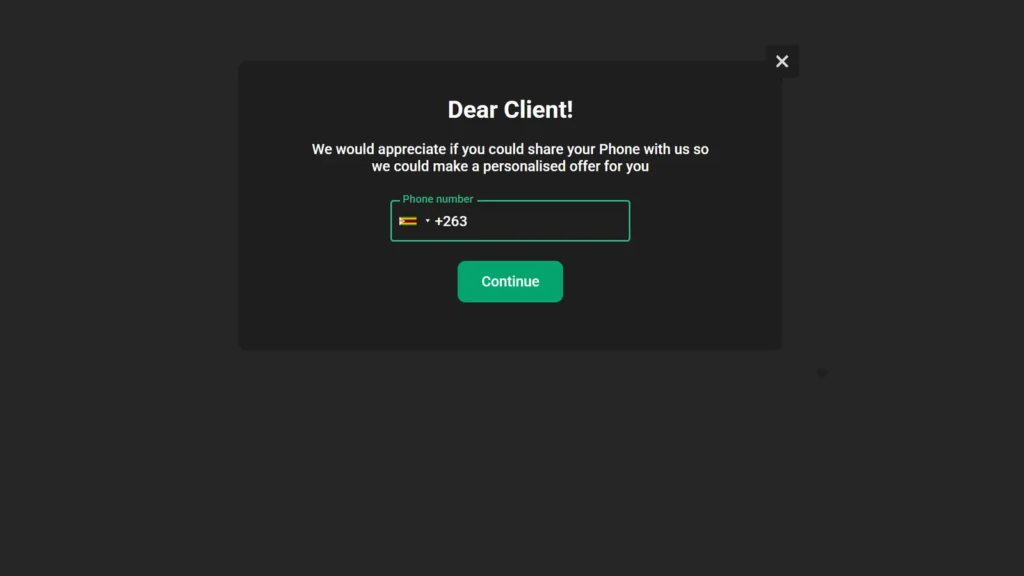
After you confirm, a Dear Client! pop up asks for your phone number so Weltrade can send you personalised offers. Choose your country code, enter your number and tap Continue, or close the pop up with the X in the corner if you would rather skip it for now.
Step 4: Save Your Trading Account Details
Weltrade opens your first trading account straight away using the account type you picked in Step 1, and shows a Your account is opened screen with:
- Account type and platform (MT5)
- Server: Weltrade
- Company: Weltrade Ltd.
- Leverage for that account
- Account Number and Trading password, each with a copy button
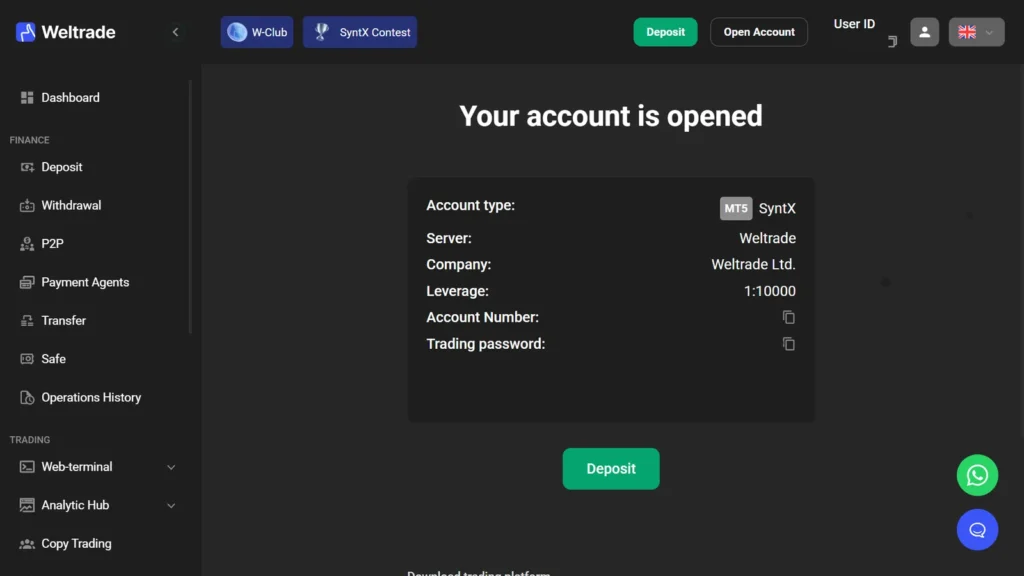
Tip: Copy the account number and trading password somewhere safe now. They are also emailed to you. The trading password is what you use to log in to MetaTrader 5, and it is different from your Personal Profile password.
Step 5: Find Your Way Around the Dashboard
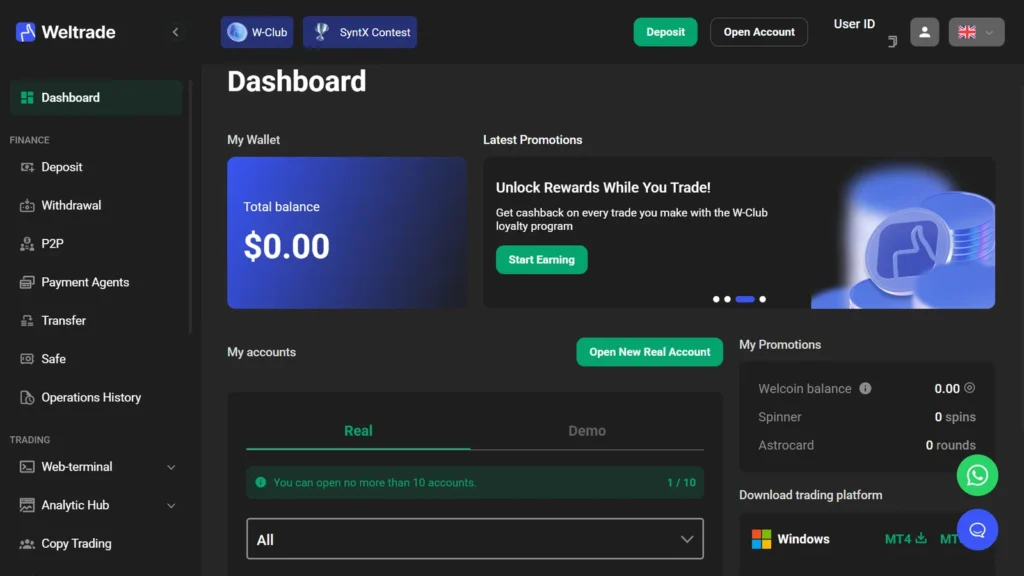
Your Dashboard shows your Total balance, your accounts under My accounts (with Real and Demo tabs), and the menu on the left with Deposit, Withdrawal, P2P, Payment Agents and Transfer. To add another account type, tap Open New Real Account. Weltrade lets you hold up to 10 accounts under one profile.
Step 6: Verify Your Identity (KYC)
You can open a trading account before verifying your identity, but you will not be able to withdraw funds, claim bonuses, or access every feature until verification is complete. It is worth doing early rather than waiting until you actually want to withdraw.
To start, go to Settings, then Verification, in your Personal Profile. Under Identity Verification (KYC), click Manage. You will be asked to select your country and document type, then upload either both sides of a national ID card or one page of a passport. The system runs automatic document recognition, which usually takes about a minute, and in some countries you will also be asked to complete a short liveness check using your device’s camera.
- Documents must be clear, complete, and in JPG, PNG, or JPEG format
- The name on your document must match the name used during registration
- Documents issued in Europe, the United States, or Canada cannot be used for verification
- If Weltrade requests proof of residence, such as a utility bill or bank statement, it must be dated within the last three months
Verification is usually completed within 24 hours. If extra checks are needed, such as proof of residence or source of funds, it can take up to 14 business days. You will get an email either way, and your Personal Profile’s Verification section always shows the current status.
Step 7: Fund Your Account and Start Trading
Once your account is open and, ideally, verified, you are ready to deposit and start trading. From your dashboard, choose a funding method and complete the deposit, then download MetaTrader 5 and log in using the account number and trading password from Step 4.
👉 If you have not opened your account yet, you can start the process here.
If you would rather test the platform with virtual funds first, Weltrade also offers a demo account you can open the same way. Just select Demo instead of a live account type during setup.
Final Thoughts
Opening a Weltrade account is a short process on paper: register, pick an account type, choose your platform settings, verify your identity, and fund the account. The part that trips people up is usually verification, mostly because they leave it until the day they want to withdraw. Handle it early, and by the time you are ready to trade for real, there is nothing left standing in your way. For a deeper look at Weltrade’s fees, platforms, and regulation before you commit, our full Weltrade review covers all of it in one place.
Get one practical trading tip a week
Free beginner tips, broker deposit and withdrawal updates for Africa and the UAE, and new guides. No spam, unsubscribe any time.
FAQ
Do I need to make a deposit to open a Weltrade account?
No. You can open a trading account without funding it. A deposit is only required once you are ready to trade with real money.
How long does Weltrade verification take?
Usually within 24 hours of submitting your documents. If Weltrade requests additional information, such as proof of residence, verification can take up to 14 business days.
Which documents does Weltrade accept for verification?
A government issued passport, national ID card, or driver’s license, plus proof of residence in some cases. Documents issued in Europe, the United States, or Canada are not accepted.
Can I open more than one Weltrade account?
Yes. Weltrade allows up to 10 trading accounts under a single Personal Profile, each with its own type, currency, and platform.
Is Weltrade available in my country?
Weltrade restricts its services to residents of the United States, Canada, the United Kingdom, European Union member states, Russia, Belarus, India, Iran, and North Korea, along with anywhere covered by international sanctions. Outside those regions registration is generally open, though it is worth confirming availability in your specific country before you start.
Trading involves risk and is not suitable for everyone. This is not investment advice. This post contains an affiliate link. If you sign up through the links above, we may earn a commission at no extra cost to you.
Weltrade offers leveraged forex and CFD trading. Trading leveraged products carries a high level of risk and may not be suitable for all investors. You could lose some or all of your invested capital, and leverage can amplify losses as well as gains. Weltrade’s primary regulatory registration is in Saint Lucia, with a South African entity referencing FSCA oversight; this is not equivalent to Tier 1 regulation (e.g. FCA, ASIC). Never trade with money you cannot afford to lose.